No cloud, no account
All decoding happens in the device. Nothing is sent to a server, and there is no login to forget. The display works just as well in a mountain cabin without coverage as at home in the driveway.
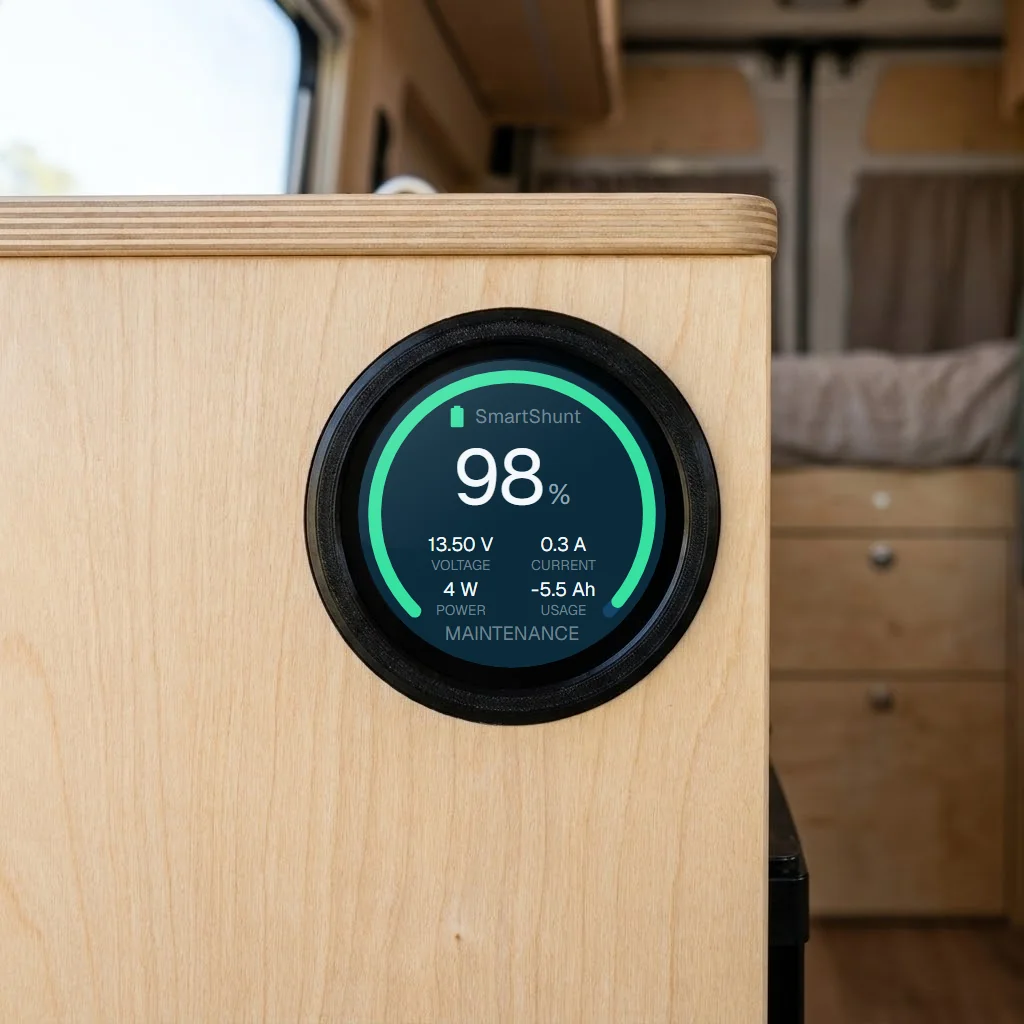
Voltvik is a round 1.28-inch screen that reads Mopeka tank sensors, Victron equipment and RuuviTag indoor and outdoor directly over Bluetooth. SmartShunt, MPPT, Orion XS and three RuuviTag sensors have been run against real equipment in a motorhome. No cloud. No subscription. No app that has to stay open on the phone.
Mopeka tank sensors already broadcast level, depth, temperature and battery percentage over Bluetooth LE. Voltvik picks it up locally and shows it on a screen you can mount where you actually need it — by the door, above the kitchen worktop or in the cab. Victron SmartShunt, MPPT and Orion XS are verified against real equipment, as are three RuuviTag sensors for temperature, humidity and air pressure — both indoor and outdoor. Inverters and combination units — Phoenix, Inverter RS, Multi RS, MultiPlus-II and Quattro — have their own page showing load, battery voltage and battery current.
All decoding happens in the device. Nothing is sent to a server, and there is no login to forget. The display works just as well in a mountain cabin without coverage as at home in the driveway.
About 0.3 W at rest and 0.5 W at full brightness with WiFi on. You can leave it on all season without thinking about power use.
Victron equipment has six free slots, and the tank setup has two gas bottles and three water tanks. Each tank gets its own name, BLE address and calibration. For 6, 11 and 14 kg propane bottles, Bottle size fills in the empty/full readings automatically, and gas can be shown as kilos left. The WATER page shows three horizontal rows with the customer’s own names; grey water and black water get mirrored colour logic because free space is what matters there.
Power on, turn on setup WiFi, connect the phone to the open Voltvik-XXXX network and enter keys, addresses and tank setup. The name begins with Voltvik- and four uppercase characters, for example Voltvik-BE84. No password, no cables to a PC, no software to install.
New firmware is loaded straight in from the setup page. No USB cable, no flashing tool — just download the file and press update.
Warnings should be clearly shown on the screen — even when the phone is in your pocket. The battery frost guard warns if the battery is charged below freezing, and the WATER page has its own frost line for the coldest water tank.
Victron devices send “Instant Readout” packets over Bluetooth LE, and Mopeka sensors broadcast tank measurements. Pro Check H2O and Pro Check LPG are both verified on real hardware.
You paste in one encryption key per Victron device. Mopeka is read without a key by Voltvik’s own parser, which knows ten sensor types, including Pro Check H2O and Pro Check LPG.
Charge level as a percentage, voltage, current in and out, power, ampere-hours, kilowatt-hours, tank level and kilos of propane left. Swipe between pages, or let Auto-Swipe turn the pages for you.
Mopeka Pro Check H2O and Pro Check LPG, Victron SmartShunt / BMV-712, SmartSolar MPPT, Orion XS and RuuviTag indoor and outdoor are verified on real hardware — we have had them in front of us and seen the numbers match. The other Victron equipment in the table is experimental: the code is written and compiled in, it reads the same Bluetooth packets through exactly the same code as the verified devices, but no one has had one of them on the bench yet. Inverters and combination units — Phoenix, Inverter RS, Multi RS, MultiPlus-II and Quattro — have their own screen page showing load, battery voltage and battery current. BMS support has been written for JK-BMS, but requires more memory than Blikk has.
| Device | Type | Key required | Status |
|---|---|---|---|
| Victron SmartShunt / BMV-712 | Battery monitor | Yes | Verified on real hardware |
| Victron SmartSolar MPPT | Solar charge controller | Yes | Verified on real hardware |
| Victron Orion XS / Orion Smart | DC–DC charger | Yes | Verified on real hardware |
| Victron Lynx Smart BMS | BMS | Yes | Experimental — read as battery monitor |
| Victron DC Energy Meter | Energy meter | Yes | Experimental — read as battery monitor |
| Victron Blue Smart charger | Battery charger (230 V) | Yes | Experimental — shown on the DC charger page |
| Victron Smart Battery Sense | Voltage and temperature sensor | Yes | Experimental — voltage and temperature |
| Victron BatteryProtect | Low-voltage protection | Yes | Experimental — status and cut-out reason |
| Victron Phoenix Inverter | Inverter | Yes | Experimental — shown on the inverter page |
| Victron Inverter RS | Inverter with solar charge controller | Yes | Experimental — shown on the inverter page |
| Victron Multi RS | Inverter, charger and solar charge controller | Yes | Experimental — shown on the inverter page |
| Victron MultiPlus-II / Quattro | Inverter and charger — requires VE.Bus Smart dongle | Yes | Experimental — shown on the inverter page |
| Eco-Worthy, Fogstar, Roamer | Lithium battery with BMS | Not relevant | Not started |
| ABC-BMS, Daly, Renogy | BMS | Not relevant | Not started |
| JK-BMS | BMS | Not relevant | Experimental — requires Pro |
| Mopeka Pro Check LPG / H2O | Gas and water tank sensor | No | Verified on real hardware — both variants |
| Lippert / Furrion tank sensor | Tank sensor | Not relevant | Not supported |
| RuuviTag indoor / outdoor | Temperature, humidity and air pressure | No | Verified on real hardware |
About MultiPlus-II and Quattro: these have no Bluetooth radio at all — it is not turned off or hidden; it simply does not exist in the hardware. For Voltvik to read them, they must be fitted with a VE.Bus Smart dongle, which gives them Bluetooth and lets them broadcast the same Instant Readout packets as the rest of the Victron equipment. A Cerbo GX does not solve this: it talks VE.Bus to the inverter, but does not forward the numbers over Bluetooth. Inverter RS and Multi RS need no dongle — they have Bluetooth built in.
Do you have a device that is not on the list? Voltvik has a built-in BLE recording function that lets you send us a log, so support for it can be built in. Read how
Voltvik is in the validation phase and is not sold yet. Register interest, and we will let you know when there is something to try.